BLOG
By the end of 2025, we received the latest Angular release—a true game changer: Angular 21. With each new version, Angular continues to push boundaries by improving performance, simplifying APIs, and embracing reactive programming patterns.
More recently, Angular 22 was released. While it doesn't introduce a large number of brand-new features, it focuses on maturing the framework by promoting many experimental and developer preview capabilities to production-ready status, making them stable and ready for everyday use. As well, there are some new features introduced in this release that are still in the experimental or developer preview stage and remain under active testing. With that in mind, let's dive into Angular 22 and explore all mentioned features.
Signal forms
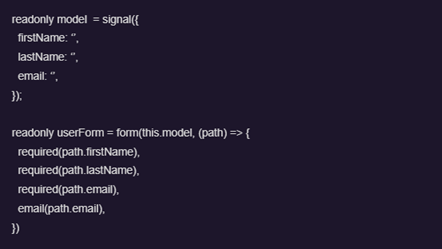
Signal Forms provide a composable, reactive approach to form state using signals. If you tried them in v21, the concepts will feel familiar, but in v22 they're officially supported for production use.
With the Signal Forms approach, the form state is represented as a signal. This means updates are synchronous, type-safe, and work seamlessly with computed() and effect(), reducing the need for manual subscriptions and boilerplate code.

Angular Resource API (Signal-based async data)
The Resource API introduces a new way to handle asynchronous data in Angular using signals. It simplifies common patterns like fetching data from an API, handling loading states, and managing errors.
Instead of manually subscribing to observables and maintaining separate state variables, developers can now define a reactive resource that automatically updates when its dependencies change.

Key advantages of this new practice:
- Removes the need for manual subscriptions
- Built directly on Angular signals
- Automatically reacts to dependency changes
- Built-in loading and error state handling
- Cleaner replacement for many simple HttpClient + RxJS patterns
Angular ARIA – A Headless Accessibility Layer
Angular ARIA is a new library that provides a set of headless, accessibility-first directives designed to help developers build fully accessible components without manually implementing all ARIA roles, keyboard interactions, and focus management logic.
Instead of providing pre-styled UI components, Angular ARIA focuses purely on behavior and accessibility structure. This means developers are responsible for the HTML structure and styling, while the library ensures that components follow proper WAI-ARIA patterns and remain usable with assistive technologies.
New Service decorator
The new version introduces a new @Service decorator as a simplified alternative to @Injectable({ providedIn: 'root' }). When using @Service, the service is automatically registered as a singleton and provided at the root level of the application by default. This means it is shared across the entire app without the need to explicitly configure its provider scope. The goal of this decorator is to reduce boilerplate and provide a more straightforward way of defining simple, application-wide services in modern Angular applications.
The new defaults
OnPush change detection strategy
In Angular 22, the default change detection strategy has shifted to OnPush. This change aligns Angular more closely with its performance-first direction and the broader move toward zoneless change detection. Because of this change, explicitly setting ChangeDetectionStrategy.OnPush in new components is no longer required.
At the same time, the previous default strategy, ChangeDetectionStrategy.Default, has been renamed to ChangeDetectionStrategy.Eager. This renaming provides clearer intent, emphasizing that this strategy performs more frequent and immediate checks across the component tree.
Fetch backend by default (instead of XHR)
By default, Angular now uses the Fetch API for HTTP requests instead of the traditional XHR (XMLHttpRequest).
Strict template checking enabled by default
Angular templates are now checked more strictly at compile time. What this means - Angular will catch more errors in templates, such as:
- accessing possibly undefined properties
- incorrect bindings
- invalid method calls in templates
Strict TypeScript enabled by default (TS 6.0)
With TypeScript 6.0, Angular now enables strict mode by default in new projects. What this includes:
- strict null checks
- strict property initialization
- stricter function typing
- better inference rules
Updates on Angular @switch
Angular 22 enhances the built-in @switch control flow by allowing multiple cases to share the same template block, reducing duplication and making templates easier to maintain.
In addition, Angular now provides better exhaustiveness checking. It can now be set @default never and the compiler will help detect when not all possible values have been handled in the @switch statement.

Inlining functions in Angular templates
Now there is a possibility that is supported for inline functions directly in templates, allowing developers to define simple callbacks without creating separate methods in the component class.

Improvements to host directives
Angular 22 also introduces several refinements to host directives, making their behavior more predictable and easier to work with:
- Automatic deduplication: If the same host directive is applied multiple times to a single element, Angular now deduplicates it automatically. Additionally, when a directive is matched both directly in the template and through a host directive, the template-applied directive takes precedence.
- Merged input and output mappings: Angular now merges the input and output mappings of host directives instead of allowing one path to overwrite another. This ensures that directives brought in through multiple internal paths behave consistently.
- Stricter alias validation: If the same input or output is exposed under multiple aliases, Angular will now report an error, helping developers catch configuration issues early and avoid ambiguous APIs.
Other Notable Updates in Angular 22
In addition to the major features, Angular 22 includes several smaller but valuable improvements:
- Spread operators and rest arguments in templates: Template expressions now support JavaScript spread operators (...) and rest arguments, making it easier to work with arrays, objects, and function calls directly within templates.
- Improved nested leave animations: Leave animations are now scoped to component boundaries. Nested elements complete their exit animations before the parent is removed, resulting in smoother transitions. This behavior applies within the same component and does not extend across child component boundaries.
- Comments in templates: Angular now supports comments in templates, making it easier to document complex markup. If you're using Visual Studio Code, you can also toggle comments directly from the editor.
- Optional chaining now follows JavaScript semantics: Template optional chaining (?.) has been aligned with standard JavaScript and TypeScript behavior. Instead of returning null, it now returns undefined. To simplify migration, the ng update process automatically wraps existing expressions with a compatibility marker that preserves the previous null behavior until you're ready to adopt the new standard.
Sneak Peek to upcoming: @boundary Error Handling in Templates (Developer Preview)
A new experimental feature, expected in developer preview around Q3 2026, introduces the @boundary template syntax — a new way to implement error boundaries directly in Angular templates.
The idea behind @boundary is to improve resilience in UI rendering. In complex applications, if a single component fails during a critical user flow, it can sometimes lead to broken views or even a blank screen due to change detection crashes.
@boundary addresses this by allowing developers to isolate parts of the template within a protected “error boundary” block. If an error occurs inside the boundary, it won’t cascade and break the rest of the page.